![snapfix_logo.png]](https://support.snapfix.com/hs-fs/hubfs/snapfix_logo.png?height=40&name=snapfix_logo.png)
Snapfix Recommends is rolling out to all customers on a phased basis. If you don't see it on your account, don't worry, it will be there soon.
Introduction
Snapfix Recommends is a smart layer inside task creation. When someone on your team starts a task, Snapfix looks at what they have already given it, a photo, a few words, a chat message, or a QR scan, and suggests the rest. Title, group, assignee, tags, and area or room.
They review, they decide, they create. Fewer forms, faster tasks, cleaner data.
Snapfix Recommends is on by default in every site. Site admins can turn it on or off any time in Site Settings. Your existing user permissions are fully respected.
Why we built it
We heard four things, over and over, from Snapfix customers:
- Manual task creation is slow and inconsistent.
- Tasks sit unassigned, or land on the wrong person.
- Tags and names are all over the place, so reporting is hard to trust.
- Frontline staff want to get on with their shift, not fill in forms.
Snapfix Recommends removes the typing and the guesswork, so your team stays focused on the work.
What Snapfix Recommends fills in for you
- Title, based on the photo, scan, or initial input.
- Group, based on site settings and who raised the task.
- Assigned to, based on availability, workload, and skill relevance.
- Tags, reusing your existing conventions before creating anything new.
- Areas and rooms, based on site settings and naming conventions.
Where it works
Snapfix Recommends is available anywhere you create a task, and the experience is consistent across web, iOS, and Android.
- Photo, from the + button in the app.
- Text, from the + button in the app.
- QR code scan, triggered outside the platform.
- Chat, by long-pressing a message on mobile or using the kebab menu on web.
How it feels in the app
Your team takes a photo, types a title, or opens a chat message. Snapfix suggests the rest, quietly and quickly.
- Suggested fields carry a small Snapfix Recommends indicator, so users know what came from the assistant.
- If Snapfix contributed anything, a short Snapfix Recommends note appears at the bottom of the task detail. Fully manual tasks show no note.
- Newly created tags (rare, and only when allowed) show a small New badge until the task is submitted.
- When Snapfix is not confident about a field, it leaves it blank. No guesses, no clutter.
You stay in control
Snapfix Recommends is assistive, not authoritative. Your team always has the final say.
- Every suggested field is editable.
- Snapfix never silently overwrites what someone has typed.
- Users can change, clear, or accept any suggestion before submitting.
- If Snapfix cannot confidently fill a field, it leaves it to the user to complete.
Smart about tags
Consistent tags are the backbone of useful reporting. Snapfix Recommends protects that:
- Existing tags come first. Snapfix always tries to reuse your current tags before creating anything new.
- A new tag is only created when no existing tag fits, confidence is high, naming matches your conventions, and admin settings allow it.
- Snapfix will never create a new group.
Permissions, reflected in what Snapfix can do
Snapfix Recommends never gives anyone more access than they already have. Your permission model is respected end to end.
- If a user cannot create tags, Snapfix will not create tags on their behalf.
- If a user is not a member of a group, tasks will not be routed to them in that group.
- If a user has switched off auto-assign in their own settings, Snapfix will not recommend them as an assignee.
Controls and settings
Site-level settings (site admins only, in Site Settings):
- Enable Snapfix Recommendations. Default ON. When enabled, Snapfix can pre-fill fields for every user on the site.
- Use my tags. Default OFF. When ON, Snapfix will only suggest tags that already exist.
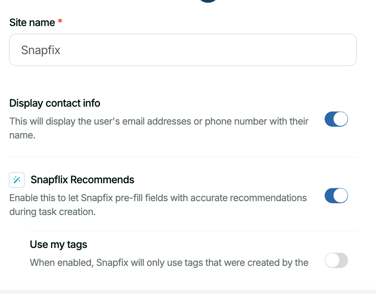
User-level settings:
- Enable auto-assign. Default ON. Turn off if you do not want Snapfix to suggest you as an assignee.
- Tag creation permission, managed through your existing Add/Edit/Delete tag settings. If this is off for a user, Snapfix will not create new tags for them. They can still apply tags that already exist.
There is no user-level toggle to disable Snapfix Recommends as a whole. That decision lives with site admins, so the experience stays consistent across the team.
What Snapfix looks at to make a suggestion
Recommendations are grounded in your own data and conventions:
- Title: existing naming conventions in your site.
- Group: site settings and who raised the task.
- Assigned to: availability signals (login, recent activity), skill relevance (work history, group membership), and load balancing.
- Tags: site settings and existing tag library.
- Areas and rooms: site settings and existing naming conventions.
For chat-created tasks, Snapfix looks at the 25 messages before and 25 messages after the triggered message to understand context.
Built to stay fast
- 95% of suggestions return in under 1 second.
- Works consistently across web, iOS, and Android.
- Designed to preserve the "3-second work order" experience.
- If the assistant fails for any reason, the experience falls back to standard manual entry.
Notifications
To give you a moment to review, we delay notifications only when Snapfix suggested the assignee and the user has not edited it:
- Snapfix-suggested, no interaction: the assignee is notified after 1 minute or when you leave the page, whichever comes first.
- Manual assignment: the assignee is notified immediately.
- Reassignment at any point: the new assignee is notified immediately.
Important Notes ⚠️
- Snapfix Recommends does not create or assign groups.
- It does not yet work with voice or video input.
- It does not create new categories, fields, or workflows.
- It does not apply suggestions to tasks that are already open.
- There is no user-level toggle to disable the feature (site-level only).
Related Help Articles
📖 How to Manage Tags with the Tag Utility
📖 How to Add New Users to Your Snapfix Site
Need Help? Contact Snapfix Support
📧 Email: support@snapfix.com